 Inventory
Warehouse & Input Tracking
Purchased fertilizer, crop protection products, seed, and diesel enter your warehouse; field usage deducts remaining stock automatically.
 ÇAD
ÇAD
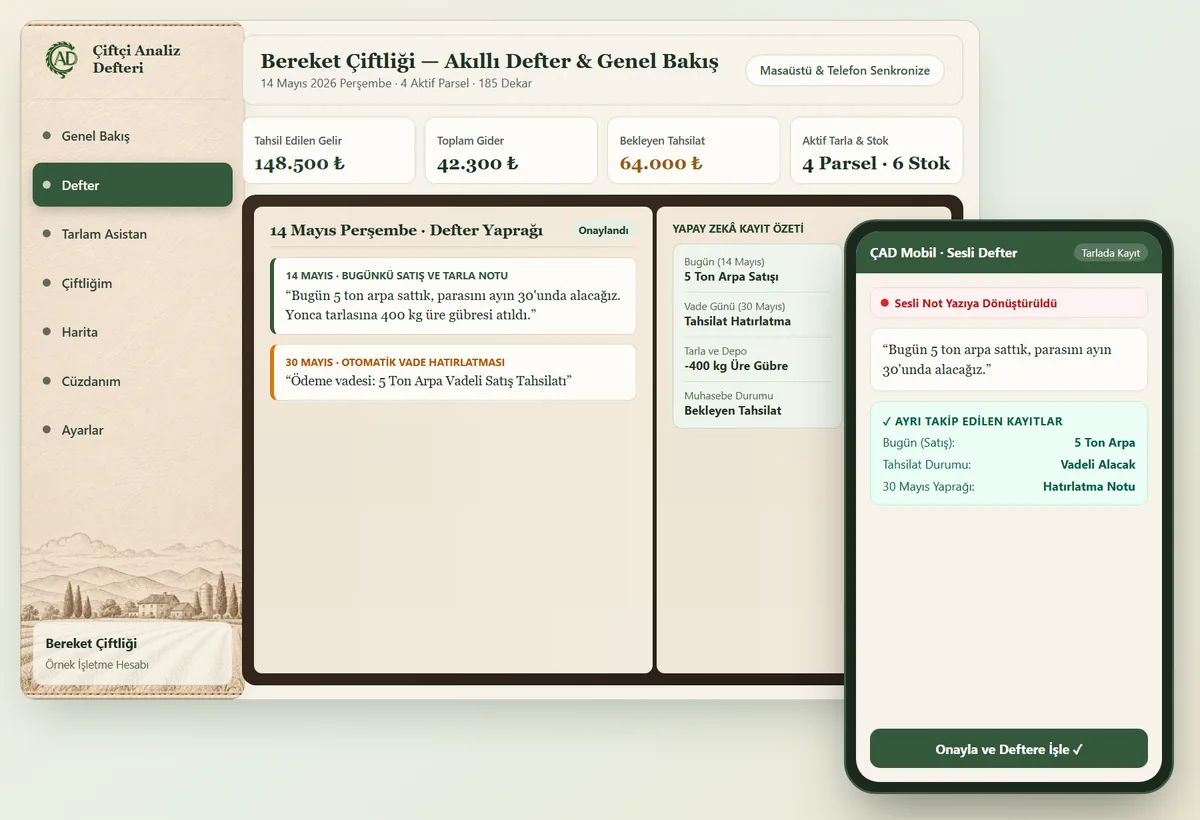
Skip complex spreadsheets. Type or speak what you did in the field in your own words; your AI-powered farm notebook drafts your income and expense entries, field logs, and inventory updates for your approval.
HOW IT WORKS
Built around a familiar daily planner layout instead of cluttered menus.
Record field work, diesel purchases, or crop sales in plain language just as you would in a paper notebook.
The assistant separates field operations, input quantities, income, expenses, and payment due dates automatically.
With one confirmation, your field history, warehouse stock, and payment reminders are updated together.
1. SMART FARM NOTEBOOK
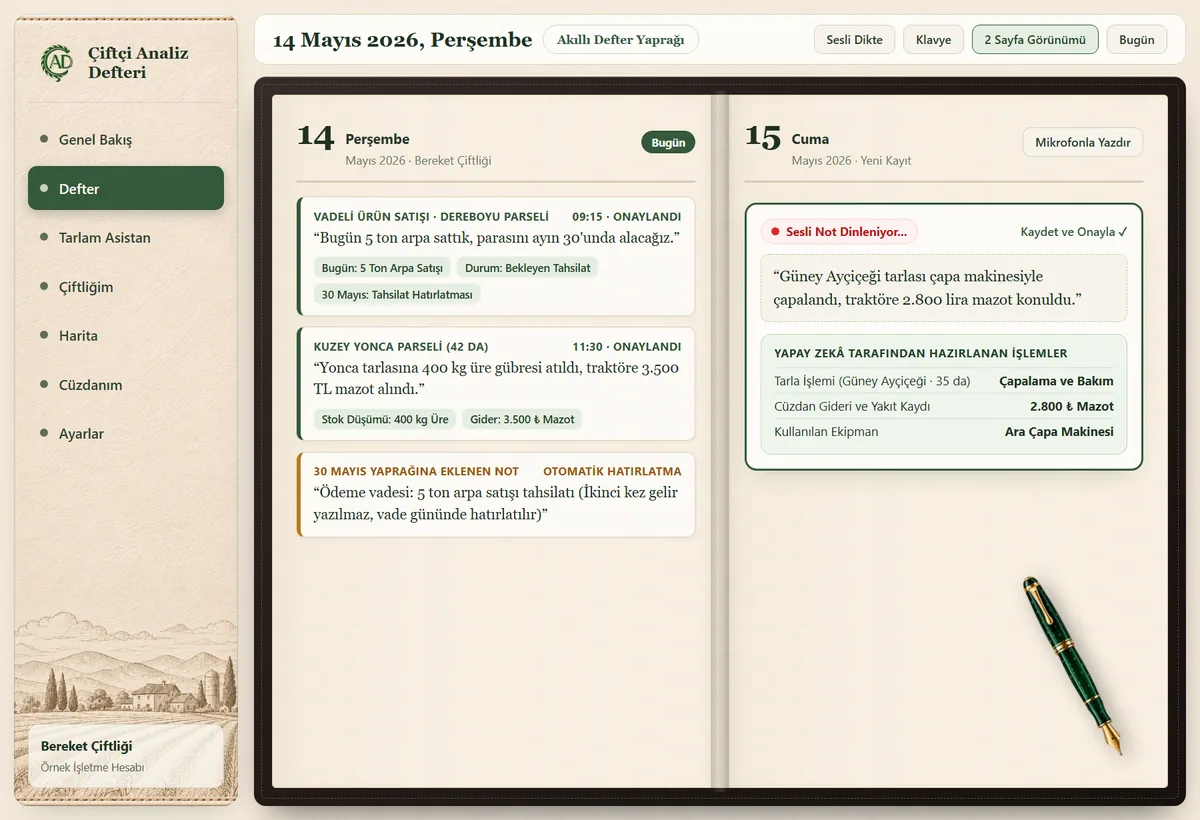
Each day opens its own dedicated page where you can write in your own words. When typing in the field is inconvenient, tap the microphone and turn your voice into a clean notebook entry.
Real Notebook Example — Today's Page
“Sold 5 tons of barley today, payment due on the 30th. Applied 400 kg of urea fertilizer to the alfalfa field.”
How It Is Organized in Your Notebook
2. AI FARM ASSISTANT
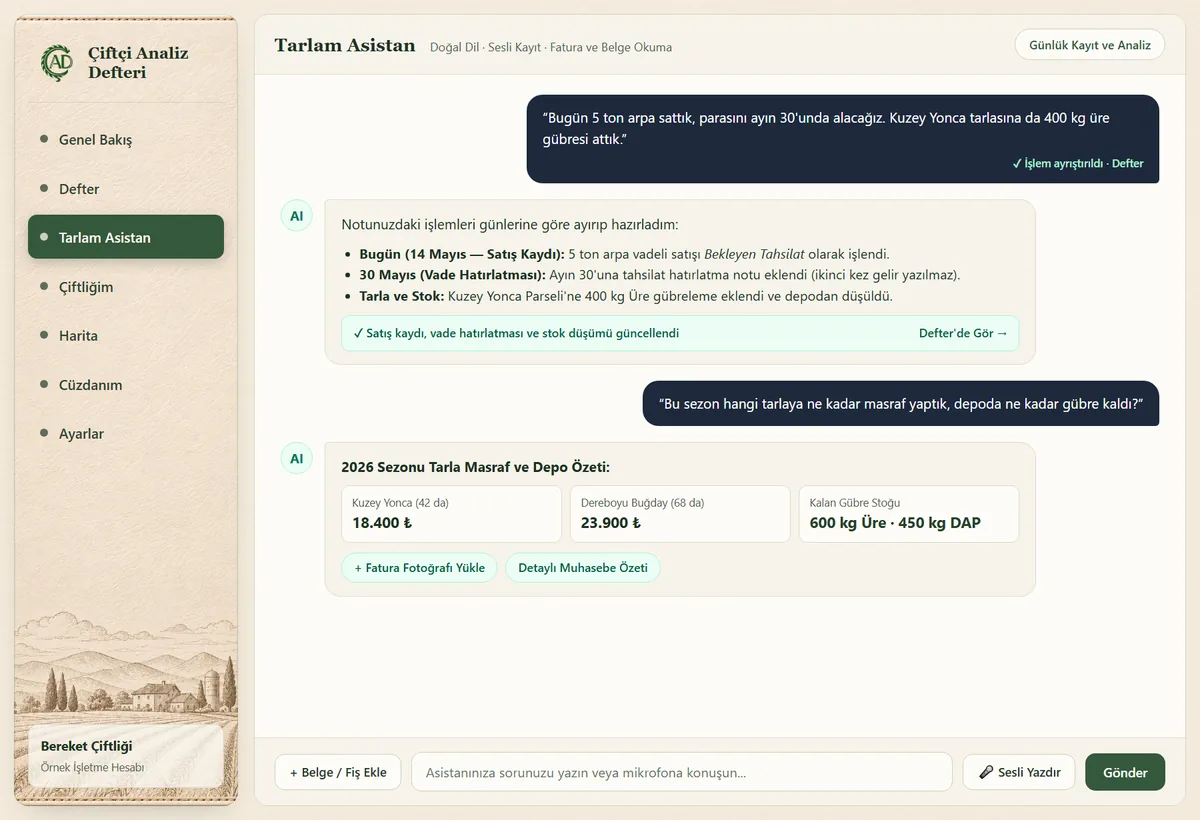
No need to fill out long forms. Your AI farm assistant reads your plain-language note or receipt photo and drafts the corresponding field, inventory, and bookkeeping entries for you to review.
“Sold 5 tons of barley, payment on the 30th” logs the sale on today's sheet and places a payment reminder on the 30th.
Snap a photo of a diesel or fertilizer receipt; the assistant prepares the expense entry and adds the purchased quantity to your warehouse stock.
“How much did we spend on each field this season?” gives you a parcel-by-parcel breakdown of seasonal costs and remaining stock.
3. FARM RECORDS & RECEIVABLES
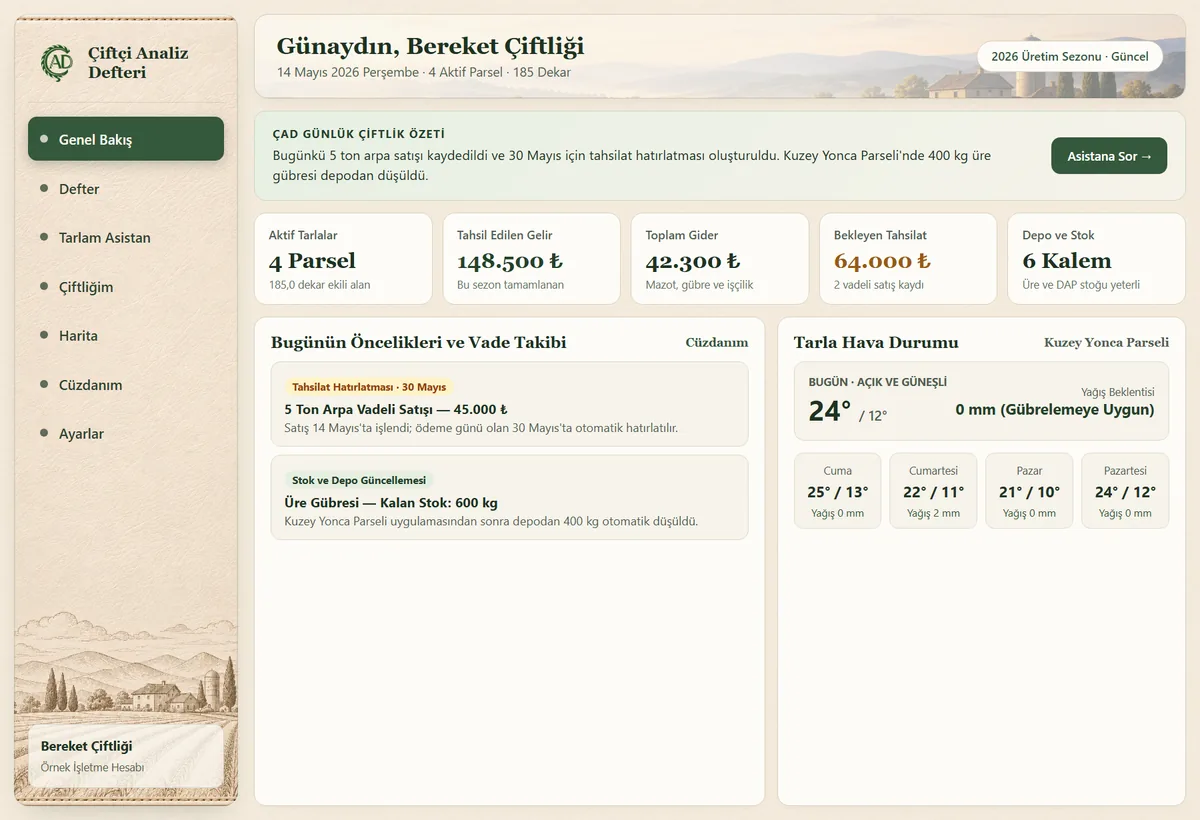
In farm bookkeeping, the day a crop is sold and the day payment is collected stay distinct. Credit sales are recorded on the sale date as pending receivables, while the due date shows a collection reminder without double-counting revenue.
Credit Sale Tracking Example
“Sold 5 tons of barley today, payment due on the 30th.”
1. Sale Date (Today)
The 5-ton barley sale and receivable amount are logged as Pending Collection on today's ledger.
2. Collection Date (The 30th)
Revenue is not counted twice; your notebook opens a Payment Due Reminder for follow-up.
Income & Crop Sales
See how much produce was sold from each field along with collected and pending amounts in one list.
Example: 5 t barley sale → Pending collection
Expenses & Stock Purchases
Record operating costs while automatically adding purchased fertilizer, crop inputs, and fuel to your warehouse.
Example: Diesel purchase → Expense & stock entry
Due-Date Reminders
Get reminded on both your daily notebook page and the Overview screen when credit sales or supplier bills come due.
Example: The 30th → Collection due reminder
4. FIELD MAPPING
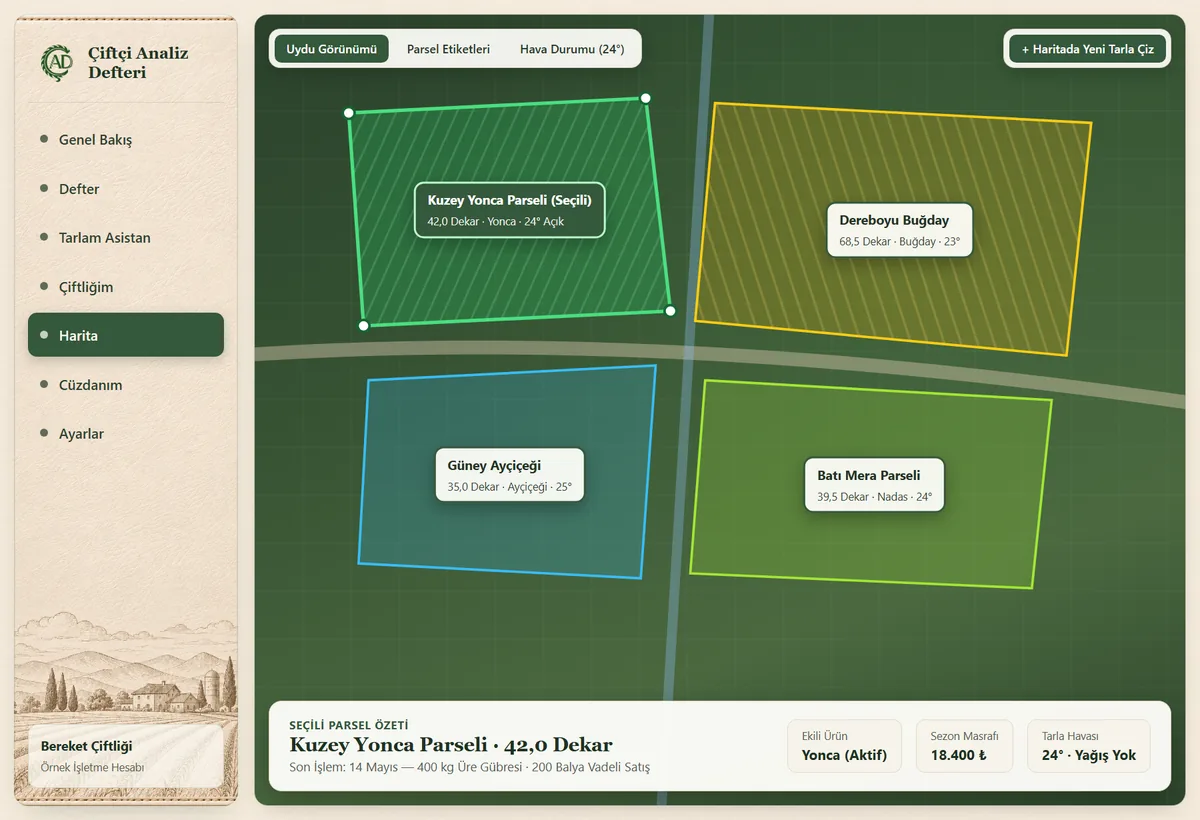
Draw field boundaries directly over satellite imagery. Check planted crops, completed field operations, and seasonal input costs for every parcel at a glance.
Latest operation: 400 kg urea application · Parcel costs and local field weather tracked on the same card.
Polygon boundary points, planted crop details, and harvest sale records kept together.
5. FARM OPERATIONS
Every entry you approve in your notebook stays connected to your warehouse stock, tractor maintenance records, receipt archive, and parcel weather forecasts.
InventoryPurchased fertilizer, crop protection products, seed, and diesel enter your warehouse; field usage deducts remaining stock automatically.
 Equipment
Keep track of oil changes, inspections, insurance renewals, and repair costs for your tractors and implements by date.
 Archive
Don't lose paper slips; snap a photo and attach it directly to the related crop sale, expense, or equipment log.
 Weather
Check location-specific rainfall and temperature forecasts for your parcels to plan planting, fertilizing, and spraying days.
FREQUENTLY ASKED QUESTIONS
No. ÇAD is designed around a simple daily notebook. Instead of filling out complex tables, you write or speak what happened on the farm in plain words.
The AI assistant reads your written or spoken note, separates the field operation, input quantities used, expenses, or crop sales, and shows you a clean draft. Nothing is saved to your ledger until you review and approve it.
Yes. For example, if you note a barley sale today with payment due on the 30th, the sale is recorded on today's date as a pending receivable and a separate collection reminder is placed on the 30th—so payments aren't forgotten and revenue isn't counted twice.
No. ÇAD is an internal farm management and operational bookkeeping tool for tracking your own income, expenses, receivables, inventory, and receipt photos. It does not issue statutory tax invoices or submit government filings.
Yes. ÇAD runs in your web browser on both mobile phones and desktop computers. Notes or receipt photos added from the field sync to your account immediately.
While this overview page is available in English, the live ÇAD web application (app.ciande.com) currently operates with a Turkish interface.
GET STARTED TODAY
Replace scattered paper notebooks, missed payment dates, and lost expense slips with one connected farm ledger. Create your free account in a minute (web app interface currently in Turkish).